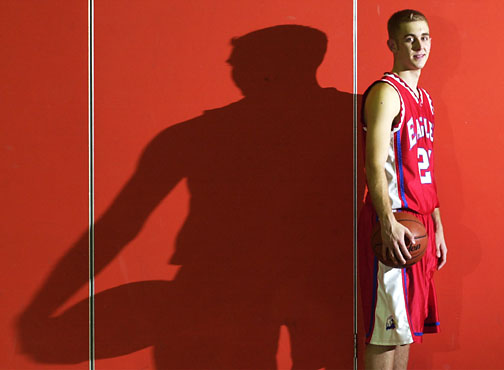
Lighting 101: Hard Light
When most of us started out using flash, we did it primarily to increase the quantity of light. But the quality of the light really stunk. So we started looking at work from other photographers, who used things like bounce, umbrellas, soft boxes, etc., to change the quality of the light. And we began to think, "Hard light bad, soft light good."
Those bad early experiences, I suspect, have built into many of us a bias against hard light. Which is really a shame.
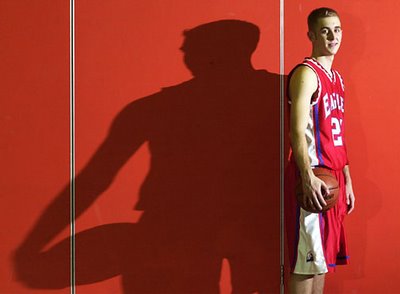
There is nothing inherently wrong with hard light at all. The problems with our bad early experiences were largely the result of bad light direction (as in "on camera") and truly horrid lighting ratios (as in "nuke 'em 'till they glow.")
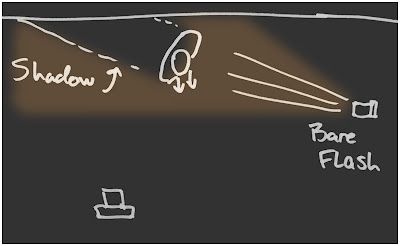
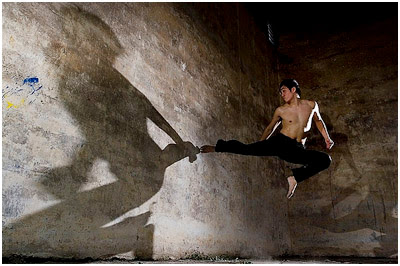
But if you approach hard light with an eye toward light direction, light color and lighting ratio, hard light can really work for you. Which is a good thing for small strobe users, because these units really do have a lot of power to give if you are not diffusing it away.
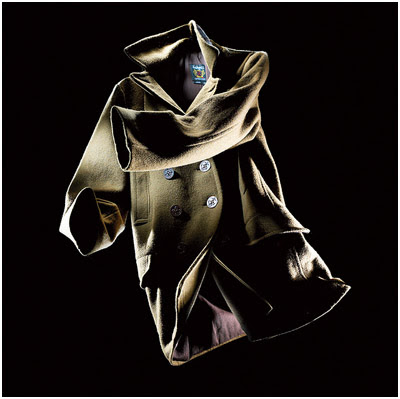
And hard light - especially from multiple angles - has a crisp, high-end (if you mind your ratios and fill) look that reproduces well even when printed on
Soft light may be safer, more predictable light. But, the way I see it, the little TFT displays on the back of our Nikons and Canons give us the feedback we need to live out on the edge a little when it comes to light.
If you want to dip your toe in the water, try working close to the ambient level. (If you do not know what I mean, you will learn how to do this a couple of posts down from here.) The fact that the shadows will have good detail will lessen the chances of getting a bad result with hard light. But the edgy effect will still be there.
You can easily create your own soft light/hard light combinations by using two small strobes, too.
Say you had an environmental portrait in an office. You might bounce one small strobe off of the ceiling, softly bringing the room up to, say, f/4. Then you put your other strobe on a stand, point it directly at your subject's face, and dial it down until it gives you an exposure of about f/5.6. You may wish to limit the area the hard light will hit by moving the flash up close and zooming the head to an 85mm coverage angle. Or use a quickie snoot made out of a piece of cardboard.
So, you'd be shooting at f/5.6, with the shadows lit to f/4. The effect will be crisp light on the face of your subject, with nice shadow detail everywhere. Brownie points for thinking to cool the bounced strobe down a little (with a cooling gel) and warming up the harder accent light. (You'd then have contrast in color, direction and hard/soft quality of the two lights.)
Of course, you can just as easily get this effect with just one strobe and some ambient light floating around. Which is what we will talk about next.
Next: Balancing Flash Intensity with Ambient
Get the Full Monte: Follow Strobist on Twitter.
Now Shipping from USA and UK: Strobist Lighting Seminar DVDs
Feed your brain: My Favorite Lighting/Photo Books


20 Comments:
"shooting f/5.6, with the shadows lit to f/4" might as well say "increase vector booster 3.575 degrees inverse of pi as you land your spacecraft".
I'm an a beginner who doesn't know how to measure f-stops of light, or how to adjust to shoot f/5.6 with f/4 shadows. Please help.
I am very sorry, anonymous, but this site is stated as being geared toward young pros and advanced amateurs.
I really am not even close to having the time and resources (I do this after work at night) to go back to the level of f/stops and shutter speeds.
Besides there is a ton of that kind of information available. Please check the bookshelf, as it contains a couple of general photo education books as examples.
I would suggest you ask people in the Flickr Strobist group discussion board for some examples of where to find out more about the basics. (There is a link to the group on the sidebar.)
I am sure you will have people point you in several good directions to begin your photo education.
I promise that Strobist will be here, ready for you, when you are ready for it!
Best of luck,
David
I use a Canon 20D. In practical terms, how do I accomplish the below suggestions; i.e., how do I "bring the room up to f/4"? And how do I "dial it down until it [the face] gives you an exposure of about f/5.6."? What is "it"? The flash uniy?
"Say you had an environmental portrait in an office. You might bounce one small strobe off of the ceiling, softly bringing the room up to, say, f/4. Then you put your other strobe on a stand, point it directly at your subject's face, and dial it down until it gives you an exposure of about f/5.6."
Hi Robert, you would put your 20D on manual exposure (M) and using a flashmeter take a reading of the ambient light coming from the bounce strobe (adjust output to dial down or up the amount of juice from the strobe). Do same for the light coming from the direct strobe. Be very sure your flashmeter is pointing directly at camera position, NOT toward ligiht source. A very common mistake.
Alternatively, if you cannot afford to buy even a used flashmeter, you can play around cchimping with the 20D's LCD till you get a ratio of the two lights of about 2:1 by eyeballing it.
(I wouldn't try that if it was a paying job, btw!! But if you're just getting started, chimping goes a long way)
Robert, a simpler, faster but not so persistent way of doing this is to use wireless ETTL metering:
assign different groups for the strobes:
A for direct
B for bounced
then set their ratio to 2:1 as this is the light ratio f/5.6 to f/4. Then set camera on manual, f/5.6, 1/200 to kill the ambient and shoot. You can use FEL (flash exposure lock) over your subject to check if there's enough power, otherwise raise the ISO.
Anonymous ... if you don't know the basics, check your community classes ... maybe run through the high school or college, or through a community centre. There's probably someone who will teach a basic course.
You'll be astounded and delighted by what you learn for a simple 10-week course.
Tom Legrady
Anonymous, I feel your pain. I found this site through a link on Radiant Vista and have been struggling, I mean reading through Lighting 101 for several days and somehow missed any mention that it was geared to pros and advanced amateurs. To me, 101 means a basic course. I have had two semesters at a local community college in film and darkroom and had only one day being introduced to studio lights. There are no lighting classes offered there. I am now using a Nikon D200 and have one SB800... and do not understand about f stops for flash, just for the camera aperture or how to use a meter other than TTL. Time to invest in a lighting book I guess. I do appreciate the effort it has taken to get all this information out on the web, for free no less. Thank you to David for all his work. It is fascinating and extensive, just a little ahead of where I am.
I found this site a couple of months ago and had no idea of how to go about off-camera lighting. Heck, I only just got my first SLR in May. I'm a complete beginner.
Well my first flash has arrived (Canona 580 ex ii) as have my sync cords. I've yet to use the auto settings on the flash or the camera. I've got a few really good results. Being a noob, I've had to go over the info several times to make it sink in and tryout many test shots, but if I can follow the info, then surely any other beginner can.
Many thanks to you for this great resource!!
Now to get some SB 28s and PWs!
Martin Smith
South Gloucestershire, UK
Anyone can post an example with the given parameters ?
David,
Are you using a flash meter ? Can I not user my build in meter to check if the "shadows [are] lit to f/4"
Thanks,
Q
Hi all,
I am also a beginner with flash photography...
First, Thanks Strobist for all the great info...
As for the f stop for flash...
I read something from here...http://en.wikipedia.org/wiki/Guide_number
It helps me understand a little bit more about flash f stop ..
hope it will help others too...
Hi all,
I am also a beginner with flash photography...
First, Thanks Strobist for all the great info...
As for the f stop for flash...
I read something from here...http://en.wikipedia.org/wiki/Guide_number
It helps me understand a little bit more about flash f stop ..
hope it will help others too...
First, note that a "stop" is a factor of 2 change in the total light on the sensor (during the exposure). For a given focal length and exposure time, this is determined by the area of the aperture, which is determined by the square of the radius. So an increase (decrease) of Sqrt(2), or roughly 1.4, will increase (decrease) the amount of light in the exposure. This is why f-stops go like 1, 1.4, 2, 2.8, 4, etc. They are powers of sqrt(2). Since 5.6 = 4 * 1.4, you get twice the light with f/4 as with f/5.6. Technically, f-stop is the ratio of lens focal length (f) to aperture diameter. So at an f-stop of, say, 2.8, the ratio f/d = 2.8. So the aperture d=f/2.8. This is why apertures are commonly written as f/something.
Second, since the strobe duration is almost instantaneous, relative to the shutter speed, the exposure is determined completely by the stobe power and the aperture---the shutter speed has more or less no effect. I say more-or-less for two reasons. First, the shutter consists of two curtains moving in the same direction; the first shutter opens, then the second closes. At or below a particular speed (commonly 1/250), the curtains can move fast enough that the first curtain opens completely before the second shutter closes, so a strobe flash will illuminate the entire scene to the sensor. Above this speed, the second curtain starts closing before the first is fully open, so the sensor will only see a slit of illumination when the stobe fires (faster shutter speed = narrower slit). Second, if the exposure is long enough that the ambient light becomes significant, it will affect the exposure (camera motion also becomes a concern). Set your camera at the maximum sync speed (usually 1/250) and you can mostly ignore it as far as exposure in typical indoor situations.
Now, one way to "bring the room up to f/4" and "dial it down until it [the face] gives you an exposure of about f/5.6." is as follows:
- Set your camera to manual f/4 (and max sync speed) and adjust the flash power and/or ISO until you get a satisfactory exposure of the background (by pointing the camera at the background and looking at the histogram from test exposures).
-then turn off flash 1, set camera to f/5.6, point it at the subject and adjust flash 2 power (now leaving ISO fixed) until you get a nice exposure of the foreground subject (again, chimping with the histogram).
-now turn flash 1 back on and fire away. Since flash 1 was set at f/4 and you are now at f/5.6, the camera will record only half the background light, i.e. the background will be exposed 1 stop lower than the foreground subject.
I'd like to respectfully echo a couple of the previous commenters in saying that if you're going to call your course "Lighting 101", then it would be appropriate to give a brief (a paragraph would suffice) intro on what terms like "sync speed" mean, or what aperture as a setting on a flash means rather than a camera, before throwing those terms in as though talking to a fellow experienced strobist. Especially when the course begins with selecting your first flash--you should assume people don't know flash terminology yet.
I'm very familiar with aperture and ISO and such on my dSLR, but I just got my first speedlight and am feeling a little lost among the jargon here. (Wait, my flash has an aperture too? And a focal length? How do I set 'sync speed'? Is that the same thing as shutter speed? etc.) In fact, I actually read through this course when I was first thinking about getting a speedlight, but was so quickly thrown into the jargon that I felt overwhelmed and figured I'd soldier on in available light.
You've got a lot of great information here. I'm sure I'll learn quickly. This is just a suggestion to help orient your new flash coverts, so that they can use their new toys to the fullest.
Anyone still a bit lost might want to check out these explanations of exposure and the relationship between aperture and shutter speed here:
http://www.nikon.co.jp/main/eng/feelnikon/discovery/cbp/better_pict3.htm
And this link below shows a good example of what different settings will do to your exposure (just select different settings from the drop downs, hit 'shoot it' and watch the result):
http://www.photonhead.com/simcam/shutteraperture.php
After understanding the above, key points to understand are:
1. When David mentions flash with an aperture of f/5.6 for the subject's face, he means that your camera must be set to f/5.6 to expose the face correctly (for the given amount of light from the flash). A larger aperture than this = overexposed, smaller aperture = underexposed.
2. "Dial it down" means lower the power of the flash - in manual mode. e.g. from full to half, quarter, eighth etc.
3. If the background is metered at f/4, this means your camera would need a larger aperture (f/4, one stop bigger than f/5.6) to expose it correctly, i.e. to the same level as the face. Therefore by lighting the face a little brighter, you can set the camera to f/5.6, and get a 'correct' exposure for this whilst the background is slightly underexposed (as it requires the bigger f/4 to expose correctly).
Hope this helps. As with many things, it can sound more complicated than it really is. It's worth persevering, honest!
"Be very sure your flashmeter is pointing directly at camera position, NOT toward ligiht source. A very common mistake."
ok so this confused me. if you point your flashmeter towards camera you'll be pickig up extraneous light from other sources, this means your f-stop is NOT correlative to the light you are measuring - if trying to work out your lighting ratios then you need to know what each individual light is doing, not all combined.
its what your basically doing if you are trying to calulate your lighting ratios using a spot meter - you would take readings from say the side of someones face recieving key light and the other side which is getting a bit of fill - in fact this is the most straight forward example to give since you'd be measuring from identical skin tones - and you'd have your f-stops/ratio.
if you point a flash meter straight at camera you just create a mean value for all light coming from the direction of the camera.
A good way to take an overall reading of a particular scene is to set your camera to Program mode (P) and just look at the display without even taking a picture. You can dial in your sync speed (say, 1/200s) and it will give you the corresponding aperture. Then, you just turn the wheel to Manual mode (M) and the values are transfered. Quick and easy.
Honza Pokorny Photography
Anonymous, please keep up your search for knowledge that moves you. Your high energy touched off this entire thread and prompted me to jump in.
My son pointed me toward this site, and I am so inspired I just ordered 3 SB-24s from Adorama. David, whoever you are, thank you for sharing your passion with us seekers.
Anonymous, I would like to suggest an easy experiment to get you started. Nothing about the experiment requires anything beyond basic exposure control. First though, a story about the Pearly Gates to Heaven. I have it on good authority that they are open. One can pass through without the dreaded accounting of deeds from the great ledger of life. Yes you may step right through and accept your reward. There is however an instruction book outside the Gates with a sign posted just above that says "READ ALL ABOUT HEAVEN HERE." Some do (I will be in that small number) but most just pass right through and learn by experience (same as here on Earth).
Here is the easy photographic experiment. (The experiment assumes a digital SLR with an LCD screen on the back for instant feedback): Set up a photo outdoors with a foreground main subject and a somewhat interesting background (sunset, some trees, a city skyline). Adjust your (manual, not automatic) exposure to properly expose your main subject (limits: all f-stops between f4 and f8, shutter speeds equal or slower than 1/200 sec.) Take some photos. Now underexpose your scene by 2 stops (clicks on the f-stop ring or shutter speed knob). Take some more pictures. Notice how everything is going dark. Now turn on your off-camera flash, point it at your main subject, and take more photos. Adjust flash power and flash distance from subject.
Report results.
Thanks for introducing me to the idea of wireless, lightweight flash. Here's an example of hard light from two hand-held units. All low budget items. All manual outputs, colour balance & exposure settings. Backlight naked, front light with 1/2 CTO from a free gel filter sample book :) Camera @ K4500.
Anonymous,
I too was in your shoes awhile back, and now that I've returned, I really get it.
I joined a Meet-up group that planned shoot assignments every week. We studied the basics then tried them out. There is nothing more valuable than hands-on trials.
Want instant gratification? Start shooting! Record your settings like a lab technician. Keep a book. Yes, your initial results will likely stink, but in the meantime, you'll be building a resource that you'll go back to time & time again, and you won't make the same mistakes twice!...my BOOK is invaluable to me.
Post a Comment
<< Home